
Demystifying Python Docstrings: Google, NumPy, and reST Explained (With Unicorns)
How to write clear, consistent, and professional documentation in your Python code with the three most widely used docstring styles

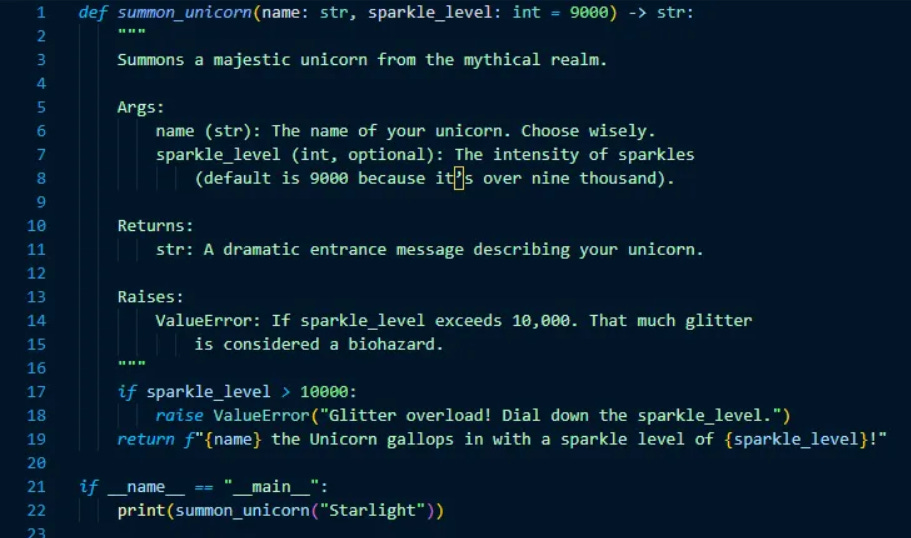
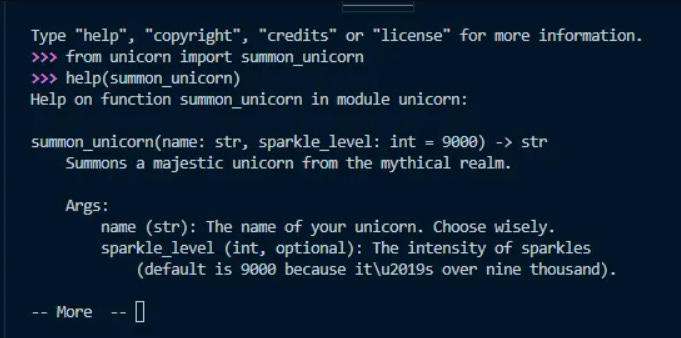
summon_unicorn() complete with a playful Google-style docstring. In the second image, we import that function and call help(summon_unicorn) in the Python REPL. This demonstrates how Python’s built-in help() function automatically pulls and displays the docstring, making it instantly accessible for developersWhen you dive into Python codebases, you’ll quickly notice something that looks like a comment, but isn’t quite one:
"""
This function does something magical.
"""
Welcome to the world of docstrings, Python’s built-in way to document code. Whether you’re building your first script or maintaining a massive library, understanding docstrings is key to writing code that’s readable and maintainable.
What Is a Docstring?
A docstring (short for documentation string) is a string literal that appears as the first statement in a Python module, function, class, or method.
Unlike comments (#), docstrings:
Are stored as part of the object’s metadata (
obj.__doc__)Can be accessed at runtime (via
help()or IDE tooltips)Are used by documentation generators like Sphinx, Python’s most popular documentation generator.
Example:
def greet_unicorn(name):
    """
    Greets a unicorn by its majestic name.

    Args:
        name (str): The name of the unicorn you wish to greet.

    Returns:
        str: A magical greeting message for the unicorn.
    """
    return f"✨ Hello, {name} the Unicorn! ✨"
Why Should You Care?
Good docstrings:
Help teammates (or future you) understand your code
Enable auto-generated documentation for APIs and libraries
Make IDEs and tools more helpful with inline docs
Bad or missing docstrings? Your enchanted functions are hidden in a misty forest, where you can’t see the unicorns…and then you’re definitely missing out.
The 3 Most Common Docstring Styles
In 2025, most Python projects stick to one of three docstring conventions: Google, NumPy, and reStructuredText (reST). Each serves a slightly different audience and use case.
1. Google Style (Most Popular)
This is the most common style today, especially in web frameworks and general-purpose libraries. It’s clean and human-friendly, with a simple layout for parameters and return values. Google uses it internally across many of their Python-based projects.
Ideal for: Web apps, API backends, and general Python projects.
Example:
def feed_unicorn(name, food):
    """
    Feeds a unicorn its favorite treat.

    Args:
        name (str): The name of the unicorn you wish to feed.
        food (str): The type of magical food (e.g., rainbow apples).

    Returns:
        str: A confirmation message from a very happy unicorn.
    """
    return f"{name} devours the {food} happily and sparkles with joy!"
2. NumPy Style (For Data Science)
This style is widely used in scientific and data analysis libraries like NumPy, Pandas, and SciPy. Its structured format works especially well for complex functions with multiple inputs and outputs, common in mathematical or data-heavy code.
Ideal for: Scientific computing, machine learning, and data analysis projects.
Example:
def feed_unicorn(name, food):
    """
    Feeds a unicorn its favorite treat.

    Parameters
    ----------
    name : str
        The name of the unicorn you wish to feed.
    food : str
        The type of magical food (e.g., rainbow apples).

    Returns
    -------
    str
        A confirmation message from a very happy unicorn.
    """
    return f"{name} devours the {food} happily and sparkles with joy!"
3. reStructuredText (reST) Style (For Sphinx Docs)
This format is tightly integrated with Sphinx. It’s commonly found in older Python libraries like Django and Flask. reST’s flexibility makes it powerful for building full API documentation.
Ideal for: Libraries and frameworks that will be documented with Sphinx.
Example:
def feed_unicorn(name, food):
    """
    Feeds a unicorn its favorite treat.

    :param name: The name of the unicorn you wish to feed.
    :type name: str
    :param food: The type of magical food (e.g., rainbow apples).
    :type food: str
    :returns: A confirmation message from a very happy unicorn.
    :rtype: str
    """
    return f"{name} devours the {food} happily and sparkles with joy!"
Cheat Sheet: Which Style Should You Use?
You’re building…
A StyleWeb app (FastAPI, Flask): Google
Data science library: NumPy
API/library for others: reST
Just want the popular one: Google
Pro Tips for Developers
In VSCode
Install: Python Docstring Generator extension
Generate a docstring: Place cursor in function >
Ctrl+Alt+D(Windows/Linux) orCmd+Alt+D(Mac)Choose your style (Google, NumPy, or reST)
In PyCharm
Built-in support: Type
"""above a function and pressEnterSet your style in
Settings > Tools > Python Integrated Tools
With AI Tools
Use GitHub Copilot or ChatGPT to generate docstrings automatically:
“Write a Google style docstring for this function.”
Final Thoughts
Docstrings aren’t just about documentation, they’re like the magical runes that make your functions come alive. Whether you’re creating a simple method for feeding adorable unicorns, or a full-blown enchanted API, adopting a consistent docstring style keeps your code clean.
What About You?
Which docstring style do you prefer for your functions: Google, NumPy, or reST? Or do you mix styles like a code sorcerer? Share your thoughts in the comments!